Appearance
Links
General Members have full access to 'Links' and can add new links, edit or delete existing ones, or use the 'Search Links' function as needed.
The 'Links' page stores important web links to external websites and reference material. These links and reference materials have brief descriptions and can be used by all portal members.
Some examples of the types of links you might want here include:
- Better Boards Articles
- Better Boards Governance Glossary
- Australian Securities and Investments Commission
- Australian Charities and Not-for-profits Commission
- Australian Accounting Standards Board
Any portal member can add another link to the list. Generally, these are important web pages or document sites that the board might need to do its work. Once added, links are accessible to all portal members. There are no restrictions.

Use a link
- When you hover over the link name, a link icon will appear.
- Click on the link to navigate to the external webpage.
Add a link
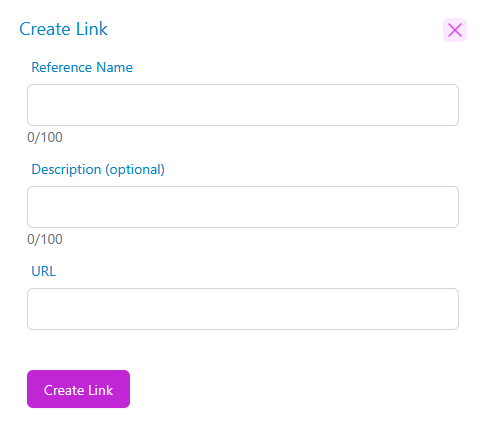
- Click the '+Add Link' button. A modal will open.
- In the modal, you will be asked to add: Reference Name, Description, and URL.
- Once you have entered the above information, click the 'Save' button, and the new link will appear in your links list.
Edit or Delete a Link
- From the 'Links' page, select the link you want to edit or delete. Look for the 'Edit'
 or 'Garbage Can' icons at the far right of the individual link.
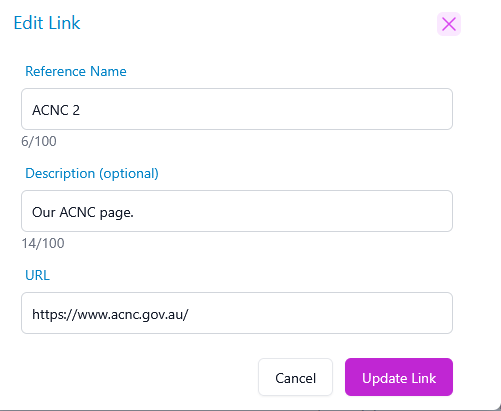
- When you click on one of the icons, a modal will appear.
- In the modal, edit the reference name, description or URL as needed. Once your changes are completed, click the 'Save' button, and the updated link will appear in your links list.
- To delete a link, click on the trash icon on the right-hand side. A modal will appear asking you to confirm that you wish to delete the link.
- Click the 'Confirm' button to remove the link permanently.
WARNING
Deleting a link is irreversible. If you removed a link in error, you will need to add it again.